
Resume guide
What Is an ATS-Friendly Resume (and How to Pass)
Most large employers run resumes through software before a human sees them. Here's what an ATS really does, what trips it up, and how to format a resume so it gets through.
What an ATS actually does
An applicant tracking system (ATS) is software that collects, stores, and sorts job applications. When you apply through a company's careers portal, your resume usually lands in an ATS first. It parses the file into structured fields (name, work history, skills), and recruiters then search and filter that database. The myth is that an ATS auto-rejects you with a secret score. The reality is more mundane and more fixable: if the software parses your resume badly, your information ends up in the wrong fields or missing, and you don't surface in the searches recruiters run.
What breaks parsing
ATS parsing fails on layout tricks, not on honest content. The usual culprits:
- Text inside images or graphics, which the parser can't read at all.
- Multi-column layouts where text gets read across columns and scrambled.
- Tables used for layout, which can merge or reorder your content.
- Headers and footers, which some parsers ignore entirely, so your contact details vanish.
- Unusual section titles like 'Where I've Made an Impact' instead of 'Work Experience'.
- Exotic fonts or text rendered as vector outlines.
What reliably works
The formatting that parses cleanly is also the formatting that reads well to humans:
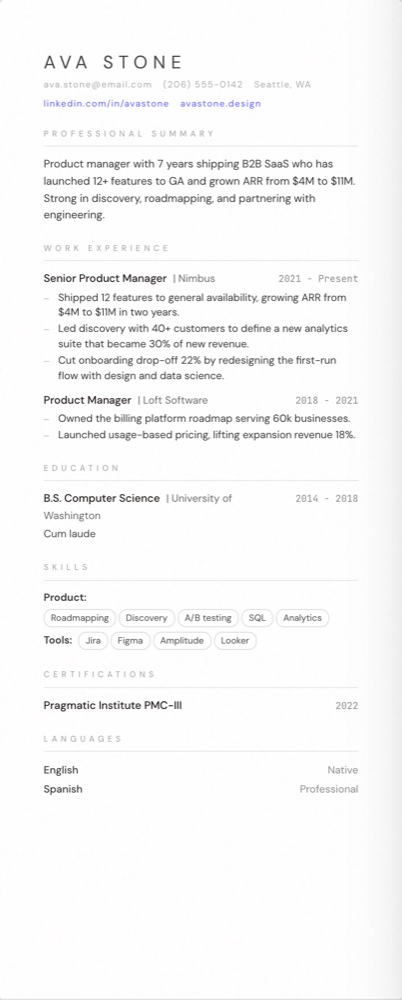
- A single-column layout, top to bottom.
- Standard section headings: Summary, Work Experience, Education, Skills.
- A common font and real, selectable text (not an image of text).
- Contact details in the body of the document, not in the header bar.
- A PDF exported from a text-based tool, so the words stay machine-readable.
Match the words in the job description
Recruiters search the ATS database using keywords from the role: tools, skills, certifications, job titles. If the posting asks for 'Kubernetes' and your resume says 'container orchestration', a keyword search may miss you. Use the actual terms from the job description, where they're true for you. Don't stuff a hidden list of keywords in white text; modern systems flag it and humans find it dishonest.
A quick pre-submit checklist
- Single column, standard headings, no tables or text-boxes.
- Contact info in the body, not the header or footer.
- Real text, common font, exported as a text-based PDF.
- Skills and tools from the job description present in your own words.
- File named clearly, e.g. firstname-lastname-resume.pdf.
Test it before you trust it
A simple test: open your PDF and try to select and copy the text. If it copies cleanly as readable text in the right order, an ATS can read it too. If you can't select it, or it copies as gibberish, the parser will struggle. Floati's builder uses single-column, ATS-safe templates by default and gives every resume a live ATS score as you edit, so you can see parsing and content issues before you submit, not after.
Frequently asked questions
Do ATS systems automatically reject resumes?
Rarely on their own. More often, poor formatting causes your details to be parsed into the wrong fields or missed, so you don't appear in the recruiter's searches. Clean formatting fixes most of it.
Is PDF or Word better for an ATS?
A text-based PDF exported from a real tool is safe with modern systems and preserves your layout. Avoid PDFs that are scanned images of a resume; those can't be parsed.
Should I put skills in a separate section?
Yes. A clearly labelled Skills section helps both the parser and the recruiter's keyword search find your tools and competencies quickly.
Can I use two columns if it looks better?
For ATS-heavy applications, prefer a single column. Two-column designs can scramble when parsed. Keep richer layouts for portals that accept them or for sending directly to a human.
Build your resume, free
A live ATS score, 12 recruiter-ready templates, and instant PDF export. No sign-up, no watermark.
Open the resume builder